> ## Documentation Index
> Fetch the complete documentation index at: https://citdhq.com/docs/llms.txt
> Use this file to discover all available pages before exploring further.
# Competitors
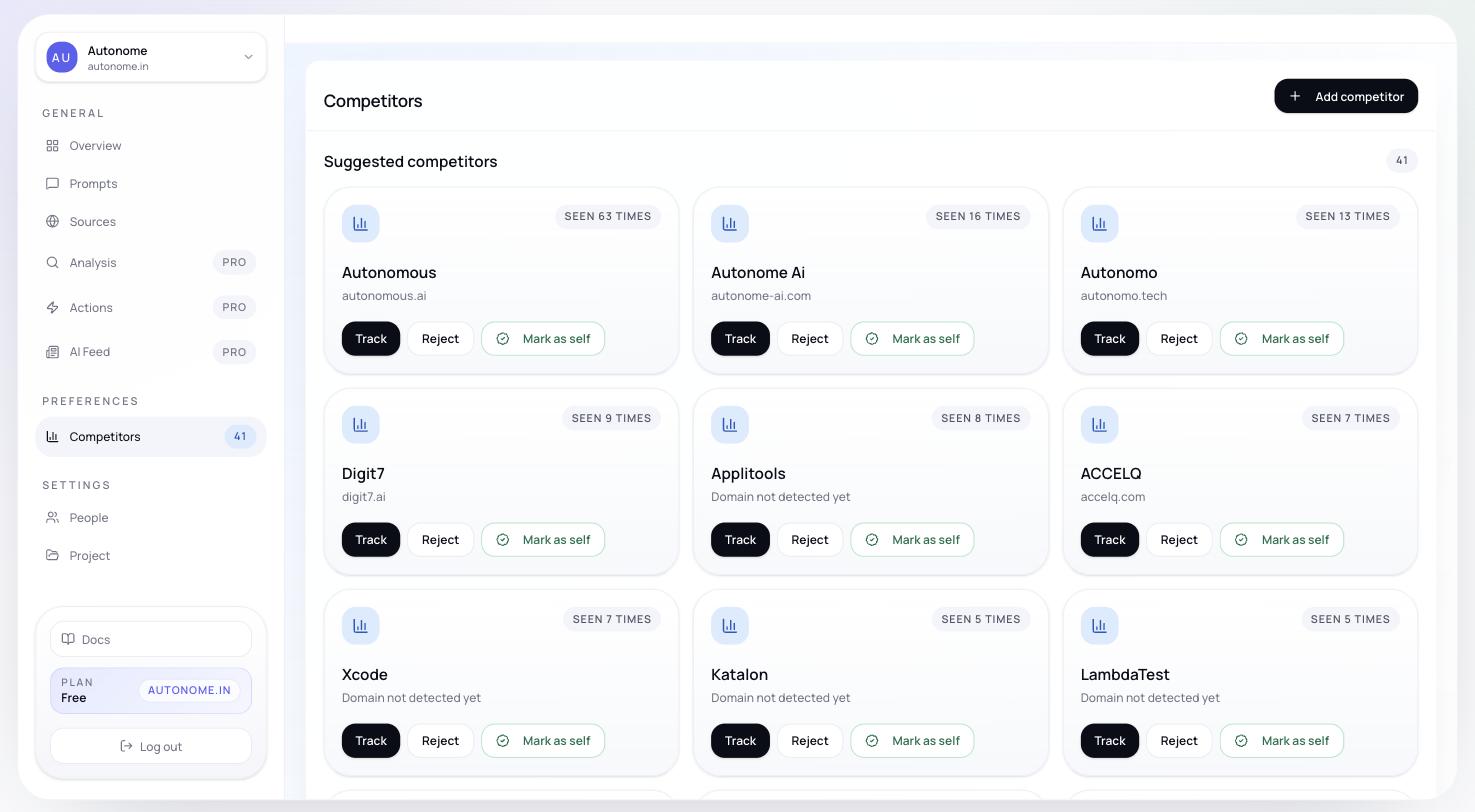
> Manage the stores you benchmark against — review detected competitors, accept the ones that matter, and keep your comparison set focused.
Citd automatically detects competing brands from tracked AI responses, but the **Competitors** page is where you turn that raw detection into a clean, useful benchmark set.
 ## Why it matters
The competitors you mark active become the benchmark set that flows through the rest of the product. Keeping this list tight and accurate means cleaner comparisons in [Analysis](/features/analysis), more useful source intelligence in [Sources](/features/sources), and a more readable overview in [Overview](/features/overview).
***
## Suggested vs active competitors
Citd may detect many brands across a prompt set. Not all of them are worth tracking directly.
| State | What it means |
| ------------- | ----------------------------------------------------------------------- |
| **Suggested** | Detected in tracked responses; Citd thinks they may be relevant |
| **Active** | Your curated benchmark set; used across Analysis, Sources, and Overview |
Review the Suggested list regularly. New competitors can appear after each tracking run as Citd sees new brands recommended by AI assistants.
***
## What you can do here
From the Competitors page you can:
* review suggested competitors discovered from tracked responses
* accept or dismiss stores you care about
* add a competitor manually by domain
* edit tracked names, aliases, colors, and domains for each active competitor
* keep your comparison set focused on real head-to-head alternatives
***
## What to track for each competitor
For each active competitor, Citd stores:
| Field | Purpose |
| ---------------- | -------------------------------------------------------------------------- |
| **Display name** | How the competitor appears in your charts and reports |
| **Tracked name** | The name Citd matches in raw AI responses |
| **Domain** | Used for source analysis |
| **Aliases** | Alternative names or abbreviations the brand appears under in AI responses |
| **Color** | Chart color for visual distinction |
**Aliases** are especially important. If a competitor shows up as both "TrailPro" and "Trail Pro" in AI responses, add both so Citd counts them as the same brand.
***
## How competitors flow into the rest of the product
Once a competitor is active, Citd uses that set in:
* **[Overview](/features/overview)** — side-by-side comparison on Visibility, Share of Voice, and Rank across the same [prompt](/concepts/prompts) set
* **[Sources](/features/sources)** — see where their citation footprint is stronger or weaker than yours
* **[Analysis](/features/analysis)** — understand why they outrank you on specific prompts, broken down by authority, relevance, and readiness gaps
* **[Actions](/features/actions)** — generate fixes from the competitive gaps Analysis surfaces
Keep the active list short. Three to five true head-to-head competitors give you much cleaner benchmarks than tracking every brand that appeared once in a response.
***
## Next steps
See competitor performance alongside your own across your full prompt set.
Understand why specific competitors outrank you and where the gaps are.
Compare citation footprints across domains for you and your competitors.
Generate content and optimization fixes from competitive gap analysis.
## Why it matters
The competitors you mark active become the benchmark set that flows through the rest of the product. Keeping this list tight and accurate means cleaner comparisons in [Analysis](/features/analysis), more useful source intelligence in [Sources](/features/sources), and a more readable overview in [Overview](/features/overview).
***
## Suggested vs active competitors
Citd may detect many brands across a prompt set. Not all of them are worth tracking directly.
| State | What it means |
| ------------- | ----------------------------------------------------------------------- |
| **Suggested** | Detected in tracked responses; Citd thinks they may be relevant |
| **Active** | Your curated benchmark set; used across Analysis, Sources, and Overview |
Review the Suggested list regularly. New competitors can appear after each tracking run as Citd sees new brands recommended by AI assistants.
***
## What you can do here
From the Competitors page you can:
* review suggested competitors discovered from tracked responses
* accept or dismiss stores you care about
* add a competitor manually by domain
* edit tracked names, aliases, colors, and domains for each active competitor
* keep your comparison set focused on real head-to-head alternatives
***
## What to track for each competitor
For each active competitor, Citd stores:
| Field | Purpose |
| ---------------- | -------------------------------------------------------------------------- |
| **Display name** | How the competitor appears in your charts and reports |
| **Tracked name** | The name Citd matches in raw AI responses |
| **Domain** | Used for source analysis |
| **Aliases** | Alternative names or abbreviations the brand appears under in AI responses |
| **Color** | Chart color for visual distinction |
**Aliases** are especially important. If a competitor shows up as both "TrailPro" and "Trail Pro" in AI responses, add both so Citd counts them as the same brand.
***
## How competitors flow into the rest of the product
Once a competitor is active, Citd uses that set in:
* **[Overview](/features/overview)** — side-by-side comparison on Visibility, Share of Voice, and Rank across the same [prompt](/concepts/prompts) set
* **[Sources](/features/sources)** — see where their citation footprint is stronger or weaker than yours
* **[Analysis](/features/analysis)** — understand why they outrank you on specific prompts, broken down by authority, relevance, and readiness gaps
* **[Actions](/features/actions)** — generate fixes from the competitive gaps Analysis surfaces
Keep the active list short. Three to five true head-to-head competitors give you much cleaner benchmarks than tracking every brand that appeared once in a response.
***
## Next steps
See competitor performance alongside your own across your full prompt set.
Understand why specific competitors outrank you and where the gaps are.
Compare citation footprints across domains for you and your competitors.
Generate content and optimization fixes from competitive gap analysis.