> ## Documentation Index
> Fetch the complete documentation index at: https://citdhq.com/docs/llms.txt
> Use this file to discover all available pages before exploring further.
# Actions
> Ranked recommendations to improve your AI shopping visibility.
Actions are available on paid plans.
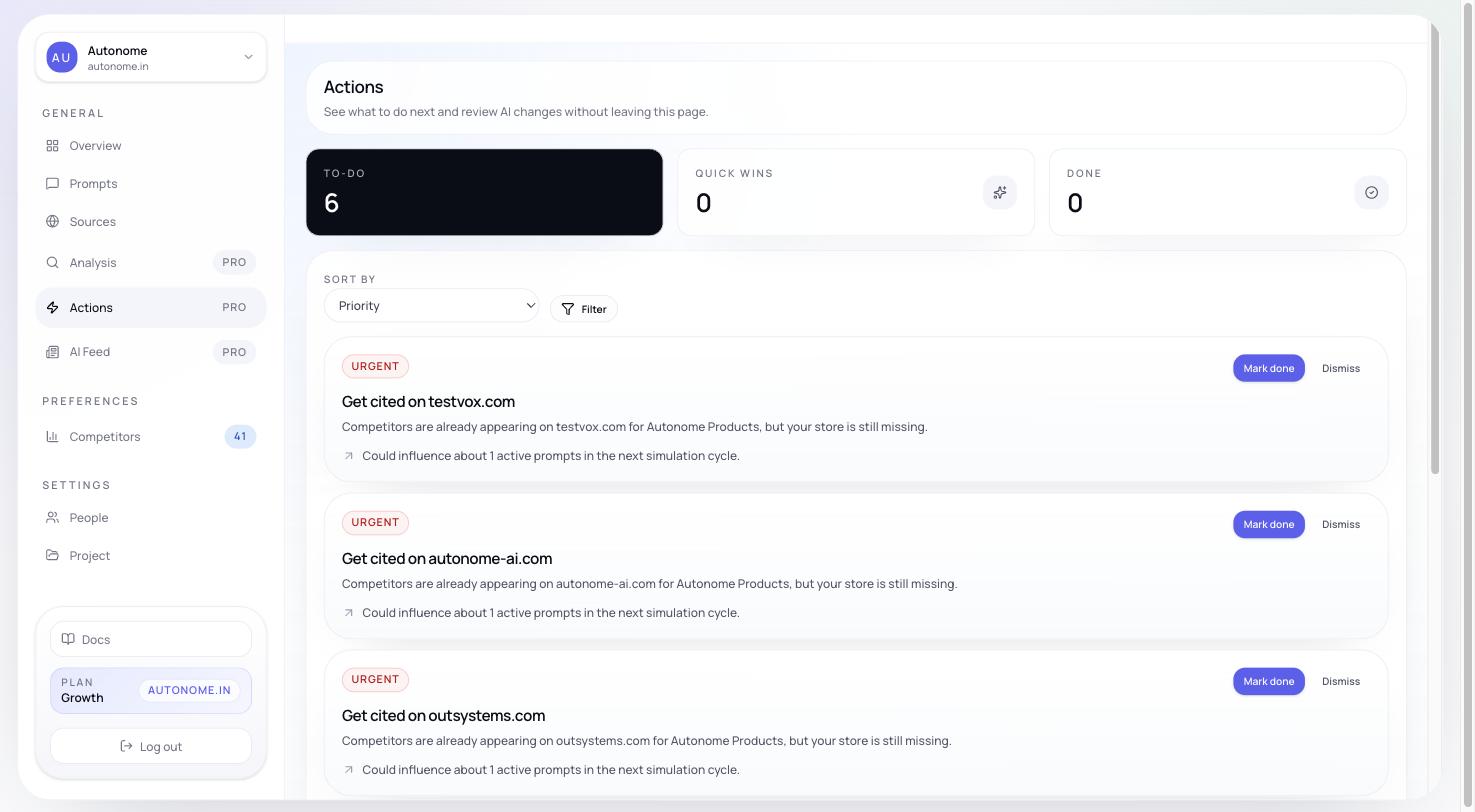
The **Actions** page turns diagnostics into an execution queue. It is where analysis becomes work.
 For catalog-wide readiness work, Actions summarizes the recurring issue and links directly into the matching view on the [Products](/features/products) page.
## What you see first
At the top of the page, Actions summarizes the current queue:
* **Active**
* **Quick wins**
* **Completed**
* **Verified**
This gives you a fast sense of how much work is open and how much has already been addressed.
## Reading an action card
Each action includes:
| Field | Meaning |
| -------------------- | --------------------------------------------------------------------------------------------- |
| **Title** | What to do, in plain terms |
| **Severity** | Deterministic priority based on prompt coverage plus fixed floors for important issue buckets |
| **Difficulty** | How much effort is required to fix it |
| **Execution** | Whether it is automatable or manual |
| **State** | Whether it is open, in progress, completed, verified, or dismissed |
| **Affected prompts** | Which tracked queries this fix will impact |
| **Expected impact** | Why this action matters in practice |
## Action categories
| Category | What it involves |
| -------------- | --------------------------------------------------------------- |
| **Catalog** | Add or update product metafields, attributes, tags, or taxonomy |
| **Content** | Rewrite product titles, descriptions, or collection page copy |
| **Schema** | Add or fix JSON-LD structured data on product pages |
| **Outreach** | Pitch products for editorial coverage or third-party reviews |
| **Collection** | Create or restructure collections to match how buyers search |
## Filters and sorting
You can filter the queue by:
* **State**
* **Severity**
* **Type**
* **Difficulty**
* **Execution**
You can also sort by **highest impact**, **newest**, or **easiest**.
This makes it easier to split the queue by owner, urgency, or execution style.
## Quick wins and backlog
Actions that are both high-leverage and relatively easy are called **Quick wins**. They appear separately from the broader backlog so teams can move fast on the highest-return work.
Everything else stays in the main backlog for ongoing prioritization.
## Severity levels
| Severity | Meaning |
| ------------ | ------------------------------------------------------------ |
| **Critical** | Directly blocking you from appearing in high-value prompts |
| **High** | Significantly reducing your rank in prompts where you appear |
| **Medium** | Improvement opportunity with measurable impact |
| **Low** | Minor polish — worth doing, but not urgent |
## How to use Actions
**Start with Quick wins and High severity.** These usually represent the best tradeoff between impact and effort.
**Then open the affected products.** Catalog-wide readiness actions include a **View affected products** shortcut so you can inspect the exact product rows, issue evidence, and Shopify or storefront links before making changes on the [Products](/features/products) page.
**For catalog and content actions, use Enrichment.** The [Enrichment](/features/enrichment) workflow can generate AI-suggested rewrites, structured tags, SEO fields, metafields, and alt text for the affected products — so you review proposals rather than writing every fix by hand.
**Then work by owner.** Catalog and schema fixes often belong to product or engineering, while content and outreach work may belong to marketing or SEO.
**Use state transitions actively.** Move actions through open, in progress, completed, verified, or dismissed so the queue stays trustworthy.
After implementing a batch of actions, use [Overview](/features/overview) to watch metric movement, [Analysis](/features/analysis) to confirm whether the original gap is shrinking, and [Products](/features/products) to validate the exact catalog rows that were affected.
## Next steps
Inspect the specific catalog rows tied to each action.
Generate AI proposals for catalog, content, and metadata improvements.
Understand the root cause behind your Actions queue before prioritizing.
Monitor metric movement after you implement fixes.
For catalog-wide readiness work, Actions summarizes the recurring issue and links directly into the matching view on the [Products](/features/products) page.
## What you see first
At the top of the page, Actions summarizes the current queue:
* **Active**
* **Quick wins**
* **Completed**
* **Verified**
This gives you a fast sense of how much work is open and how much has already been addressed.
## Reading an action card
Each action includes:
| Field | Meaning |
| -------------------- | --------------------------------------------------------------------------------------------- |
| **Title** | What to do, in plain terms |
| **Severity** | Deterministic priority based on prompt coverage plus fixed floors for important issue buckets |
| **Difficulty** | How much effort is required to fix it |
| **Execution** | Whether it is automatable or manual |
| **State** | Whether it is open, in progress, completed, verified, or dismissed |
| **Affected prompts** | Which tracked queries this fix will impact |
| **Expected impact** | Why this action matters in practice |
## Action categories
| Category | What it involves |
| -------------- | --------------------------------------------------------------- |
| **Catalog** | Add or update product metafields, attributes, tags, or taxonomy |
| **Content** | Rewrite product titles, descriptions, or collection page copy |
| **Schema** | Add or fix JSON-LD structured data on product pages |
| **Outreach** | Pitch products for editorial coverage or third-party reviews |
| **Collection** | Create or restructure collections to match how buyers search |
## Filters and sorting
You can filter the queue by:
* **State**
* **Severity**
* **Type**
* **Difficulty**
* **Execution**
You can also sort by **highest impact**, **newest**, or **easiest**.
This makes it easier to split the queue by owner, urgency, or execution style.
## Quick wins and backlog
Actions that are both high-leverage and relatively easy are called **Quick wins**. They appear separately from the broader backlog so teams can move fast on the highest-return work.
Everything else stays in the main backlog for ongoing prioritization.
## Severity levels
| Severity | Meaning |
| ------------ | ------------------------------------------------------------ |
| **Critical** | Directly blocking you from appearing in high-value prompts |
| **High** | Significantly reducing your rank in prompts where you appear |
| **Medium** | Improvement opportunity with measurable impact |
| **Low** | Minor polish — worth doing, but not urgent |
## How to use Actions
**Start with Quick wins and High severity.** These usually represent the best tradeoff between impact and effort.
**Then open the affected products.** Catalog-wide readiness actions include a **View affected products** shortcut so you can inspect the exact product rows, issue evidence, and Shopify or storefront links before making changes on the [Products](/features/products) page.
**For catalog and content actions, use Enrichment.** The [Enrichment](/features/enrichment) workflow can generate AI-suggested rewrites, structured tags, SEO fields, metafields, and alt text for the affected products — so you review proposals rather than writing every fix by hand.
**Then work by owner.** Catalog and schema fixes often belong to product or engineering, while content and outreach work may belong to marketing or SEO.
**Use state transitions actively.** Move actions through open, in progress, completed, verified, or dismissed so the queue stays trustworthy.
After implementing a batch of actions, use [Overview](/features/overview) to watch metric movement, [Analysis](/features/analysis) to confirm whether the original gap is shrinking, and [Products](/features/products) to validate the exact catalog rows that were affected.
## Next steps
Inspect the specific catalog rows tied to each action.
Generate AI proposals for catalog, content, and metadata improvements.
Understand the root cause behind your Actions queue before prioritizing.
Monitor metric movement after you implement fixes.